Trionyxio
Grid Course
Grid Course
Couldn't load pickup availability
1. Problem Statement
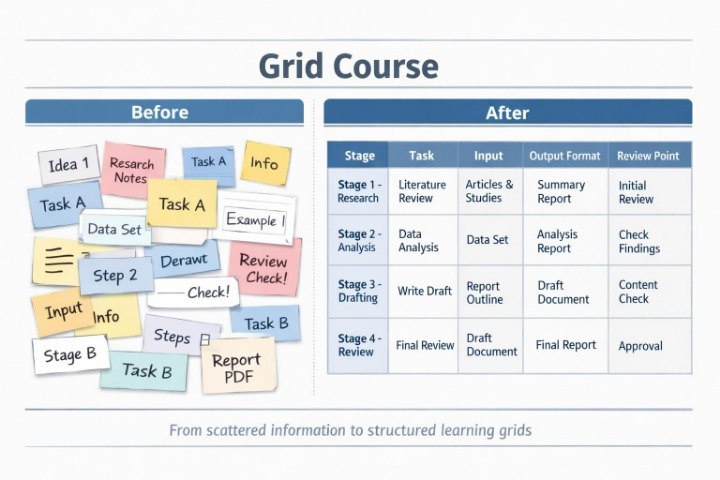
When a learner begins working with larger amounts of information, a single instruction or a simple scenario may no longer be enough. Data can be mixed, repeated, incomplete, or spread across different themes. Because of this, it can be difficult to understand which parts of the information should be used first, which can be grouped, and which should be removed from the main process. Another challenge appears when the goal is not only to receive a response, but to build a clear system for repeated use. Grid Course was created to teach learners how to work with information as an organized grid, where every element has its place.
2. Solution
Grid Course explains how to organize materials for AI automation through categories, tables, blocks, and logical links. This plan helps learners see how a broad topic can be divided into parts: input, goals, formats, examples, rules, boundaries, review, and refinement. The materials show how to create a base for a scenario before writing the instruction itself. This approach helps learners work not with a chaotic set of details, but with a prepared structure. Grid Course focuses on helping learners see order in data and use it for AI automation learning tasks.
3. What’s Inside
Grid Course contains materials that help learners study AI automation through information structuring. The first block focuses on the idea of an information grid. It explains how to divide data into logical cells: topic, subtask, input materials, expected format, examples, style rules, review, and further refinement. The learner sees that a well-prepared task does not begin with a long instruction, but with an understanding of which data is available and how it is connected.
The second block focuses on categorization. The materials show how to group information by type: text data, lists, ideas, notes, description fragments, learning themes, presentation rules, and process stages. A separate part explains why different types of information should not be mixed in one block. For example, when a goal, style, examples, and boundaries are placed together without structure, the instruction may become confusing. Grid Course teaches learners to arrange the material first and then build a learning scenario from it.
The third block is dedicated to tables for AI automation. The learner reviews how a table can help describe a process: the first column can show the stage, the second can describe the task, the third can list needed data, the fourth can define the response format, and the fifth can include review criteria. This format helps show weak points before the work begins. If a table has an empty column or an unclear row, it signals that the task needs refinement.
The fourth block contains learning examples of grids for different digital tasks. These include preparing a course description, creating a module structure, reviewing a broad topic, organizing an idea list, reviewing text materials, creating a page plan, and preparing short instructions. Each example shows how information moves from a scattered set into an ordered structure. The learner sees how the same theme can be presented as a list, a table, or a scenario.
The fifth block focuses on links between elements. It explains how one part of the information affects another. For example, the response format depends on the goal, examples depend on the topic, boundaries influence the structure, and review criteria help evaluate the final material. Because of this, the learner begins to view automation not as a group of isolated fields, but as a system of connected decisions.
The sixth block contains practical exercises for creating a personal information grid. The learner receives training tasks where they need to take a broad theme, divide it into categories, define the needed data, describe the output format, add review criteria, and form a base for a future instruction. The tasks are arranged so the learner trains not only text writing, but also material organization before writing.
Grid Course also includes a section about common structuring mistakes. These include duplicated data, unclear categories, too many columns, missing links between stages, mixing goals with examples, and skipping the review stage. Each mistake is reviewed through a learning example so the learner can notice it more clearly while working with personal materials.
4. Who Is This For?
Grid Course is for learners who already understand basic instructions and scenarios, but want to work more carefully with larger amounts of information. This plan may be useful for learners who often have many notes, ideas, text fragments, or learning themes and want to arrange them into a clear structure.
Grid Course also fits course creators, content-focused workers, editors, digital process organizers, and anyone working with materials that need sorting before an instruction is created. If Arc Bundle helps build an ordered scenario, Grid Course shows how to prepare the information base for that scenario.
5. What You’ll Learn
- Create information grids for AI automation.
- Divide materials into categories and subcategories.
- Define the role of every element in a digital task.
- Work with tables for instruction preparation.
- Group notes, ideas, and text fragments.
- Notice duplicated, missing, or unclear parts in data.
- Connect the goal, format, examples, and review criteria.
- Create a scenario base before writing an instruction.
- Review material structure before working with AI.
- Use a grid-based approach for learning and organizational tasks.
6. Refund Terms
Grid Course includes 30-day refund terms according to the Trionyxio store policy. A learner may submit a request within 30 days after placing the order if the materials do not match expectations regarding format or content. Requests are reviewed according to the store policy and the plan description on the order page.
- 💾 Digital file available after purchase
- 📚 Long-term availability
- 🔐 Secure checkout
- 🧾 Content updated in 2026
Self-paced learning overview
1. Do I need previous experience with AI automation?
1. Do I need previous experience with AI automation?
No, Trionyxio materials are arranged so the topic can be studied gradually. The lessons begin with basic ideas, explain the logic of digital processes, and show how a single task can become part of an organized scenario.
2. What format do the materials use?
2. What format do the materials use?
The materials include lessons, modules, examples, text-based schemes, learning explanations, and practical tasks. The main focus is structure, clear language, and examples that can be reviewed without naming third-party programs.
3. Can I study at my own pace?
3. Can I study at my own pace?
Yes, the materials can be studied in a comfortable rhythm. Each block can be reviewed separately, previous explanations can be revisited, and the next topics can be studied gradually without pressure.
4. How are the plans different from each other?
4. How are the plans different from each other?
The plans differ by material volume, topic depth, number of examples, practical tasks, and level of detail. Free Bundle introduces the Trionyxio approach, while the next plans expand AI automation topics through more modules and scenarios.
Share